
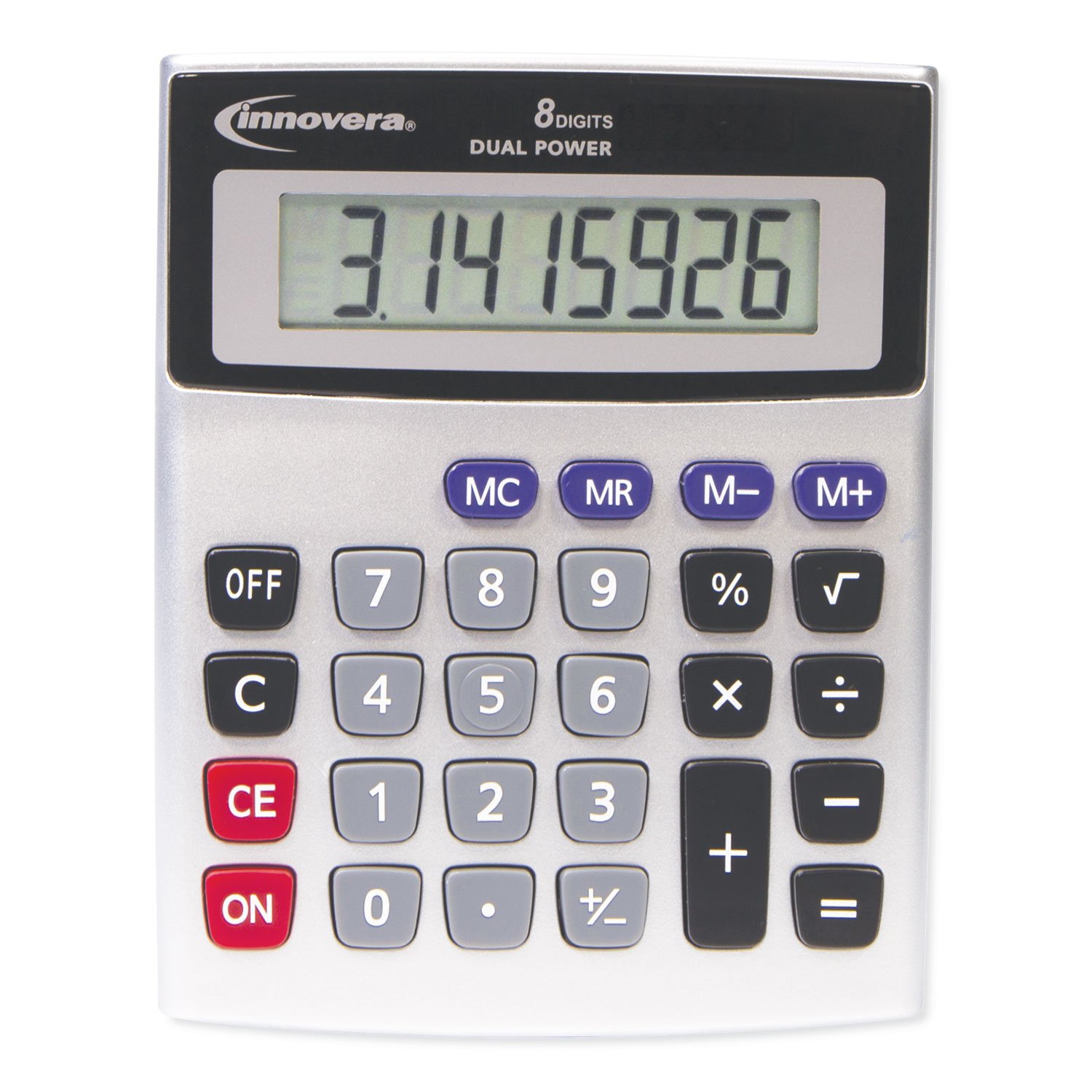
The Innovera 15927 desktop calculator dual power model is a basic office calculator designed for everyday arithmetic and routine desk work. Product listings describe an eight-digit LCD display, solar and battery power, an angled display, and a four-key memory function. It is intended for simple calculations rather than advanced scientific, financial, graphing, or programmable work. For an office, classroom, reception desk, or home workspace, a calculator like this can provide quick results without requiring a computer or phone.
Before buying the 15927, it is useful to understand what its specifications mean, what it can and cannot calculate, how dual-power operation works, and how to check a listing for the correct model. Some retailers have marked the item discontinued or out of stock, while other sellers may still list old inventory or alternatives. This guide explains the product’s reported features and provides a practical checklist for buyers.
What Is the Innovera 15927?
The Innovera 15927, also identified by the manufacturer number IVR15927 in retailer catalogues, is a desktop calculator with a compact footprint and a tilted display. It is designed for basic office work where the user needs to add, subtract, multiply, divide, calculate percentages, or use memory functions. The angled display can be easier to read from a seated position than a flat display, depending on desk height and lighting.
It is important to distinguish this model from visually similar calculators. Many desktop calculators use an eight-digit display, solar power, and familiar keys, so a product photograph alone may not identify the exact 15927. Check the model number on the carton, device label, or invoice. When ordering online, ask the seller to confirm that the supplied item is IVR15927 and not a substitute with a different key layout or specification.
Eight-Digit LCD Display
Retailer specifications describe an eight-digit LCD display. This means the display can show up to eight numeric digits at a time, subject to the way the calculator handles signs, decimals, and other indicators. For many routine tasks, eight digits provide enough capacity to handle everyday prices, quantities, totals, and percentage calculations. Users who regularly work with large values or require precise decimal handling should check whether this display capacity meets their needs.
The display is angled to improve the viewing position on a desk. This may reduce the need to lean forward, especially when the calculator is used beside a keyboard or paperwork. Lighting still matters. Bright overhead lights can create glare on some LCD surfaces, and users may prefer to position the calculator so light falls from the side. The stated display character height in some retailer listings is approximately 15 millimetres, but confirm the exact product sheet when readability is a deciding factor.
Dual Power: Solar and Battery
Dual power generally means that the calculator can use solar energy and a battery. Solar operation can help the device work under suitable ambient light, while the battery provides another power source when lighting is insufficient. This arrangement can reduce the chance that a calculator stops working simply because the desk is away from a bright window. It does not mean the battery never needs replacement or that the solar panel will operate in complete darkness.
Some product listings state that an AAA battery is included. Confirm the supplied battery type and whether it is included in the specific package being sold. If the calculator stops responding, check the display in adequate light, inspect the battery according to the manufacturer’s instructions, and look for signs of corrosion or incorrect installation. Do not force open the housing or use an unsuitable battery. If the device is new and fails immediately, contact the seller before attempting an internal repair.
Four-Key Memory Function
Listings describe a four-key memory function. Memory keys are useful when a calculation involves a value that will be reused several times. A typical calculator memory system includes keys for clearing memory, recalling a stored value, adding a value to memory, and subtracting a value from memory. The exact key labels and operation should be confirmed on the calculator itself or in its instructions.
For example, a shop worker may total a group of items and store the subtotal before adding another group. A student may keep a recurring value available while completing a set of arithmetic checks. Memory can save repeated typing, but it can also create errors if the user forgets that an old value is still stored. Clear memory before starting a new calculation when the previous session could affect the answer.
Everyday Calculation Functions
Retailer listings describe common functions such as a percent key, plus/minus switch, decimal function, and square-root key. These functions make the calculator useful for everyday calculations beyond the four basic operations. A percent key may assist with discounts, tax estimates, markups, or proportional calculations. The plus/minus key changes the sign of a displayed value, while a square-root key can be useful for simple mathematical checks.
Do not assume the calculator has advanced capabilities simply because it includes a square-root function. Available product specifications do not describe graphing, matrix calculations, statistical regression, equation solving, financial amortization, or programmable functions. If you need those capabilities for coursework, engineering, finance, or research, compare a scientific or financial calculator with a feature list that explicitly supports the required functions.
How to Use the Percent Function
Percent calculations are common in retail, office administration, and school exercises. A calculator’s percent key may be used for a discount, an increase, or a simple percentage of a value, but the exact keystroke sequence can vary across models. Read the instructions or test the behavior with a simple known example before using the calculator for an important transaction.
For example, to calculate 10 percent of 250, the mathematical result is 25. To determine a price after a 10 percent discount, subtract 25 from 250 to get 225. To increase 250 by 10 percent, add 25 to get 275. These examples help verify the result, but a calculator’s percent-key behavior should not be assumed to match every other brand. Use a written formula when the sequence is unfamiliar.
Desk Size, Display Position, and Key Layout
Available product listings provide dimensions of approximately 5.42 by 4.39 by 1.15 inches. Measurements may differ by the way a retailer records width, depth, and height, so use the manufacturer’s packaging or a verified specification sheet if the calculator must fit a specific tray or counter. Its desktop format is intended to be used on a stable surface rather than held like a pocket calculator.
Before buying for a shared office, consider key spacing, display angle, and the amount of desk space available. People who use a calculator frequently may benefit from a larger key layout and a display that can be read without changing posture. If several employees will share the calculator, place it in a consistent location and avoid storing it underneath papers where the display or solar panel may be obstructed.
Who Might Find It Useful?
The Innovera 15927 may suit reception desks, small business counters, classrooms, home offices, warehouses, and administrative teams that perform basic calculations. It can be used for adding invoice amounts, checking simple totals, working with percentages, or performing arithmetic while reviewing paper documents. Its appeal is simplicity: users can press dedicated physical keys without opening an app or switching between browser windows.
It may not be the right tool for users who need advanced financial calculations, scientific notation, statistical analysis, graphing, currency conversion, or a printer. A basic desktop calculator also does not replace accounting software or an audited financial system. For business transactions, use the calculator as a quick check and keep the underlying invoice, receipt, or transaction record as the official documentation.
Availability and Discontinued Listings
Some online listings identify the Innovera 15927 as discontinued, replaced, or out of stock, while other suppliers may still show it in catalogues. This can happen when retailers have old inventory, a supplier database has not been updated, or a substitute product has been proposed. An online product page may remain visible long after a model is no longer stocked.
When availability matters, contact the supplier directly. Ask whether the item is physically in stock, whether the package is new and sealed, and whether the product number on the carton is IVR15927. If the seller offers a replacement, request the replacement’s complete specification sheet. Compare the display, power source, memory keys, dimensions, and functions rather than accepting a substitution simply because the product photograph looks similar.
How to Evaluate a Replacement Model
A replacement calculator should be compared feature by feature. Start with display digits, LCD character height, solar and battery power, included battery, memory functions, percentage key, sign-change key, square-root function, and the overall dimensions. Check whether the replacement has an angled display and whether the keys are arranged similarly. A small change in key layout can matter to a user who has developed a fast routine around one model.
Also consider build quality, warranty, return policy, and replacement battery availability. If the calculator will be used in a busy commercial environment, choose a supplier that can provide consistent stock and support. If it is for a classroom, consider whether students can read the display and whether the device is simple enough to learn. A replacement should meet the user’s actual tasks, not merely have the same number of display digits.
Care and Basic Troubleshooting
Keep the calculator away from liquids, excessive heat, and direct sunlight that could heat the housing. Wipe the case with a soft, dry cloth and avoid spraying cleaner onto the display or keys. Do not use solvents that could damage plastic or printed legends. When not in use, store the calculator in a clean area where the keys are not pressed by heavy objects.
If the display becomes faint or the calculator responds inconsistently, check the lighting and battery condition first. Clean around the solar panel so dust does not block light. If keys stick, do not pour liquid into the keypad. Follow the instructions or contact the seller for service. A basic calculator is a relatively simple device, but opening the housing can damage clips, contacts, or the display connection and may affect warranty coverage.
Buying Checklist for the Innovera 15927
Before ordering, confirm the model number, display digits, power supply, memory features, included battery, warranty, seller’s return policy, shipping cost, and stock status. Request photographs of the actual item when buying from a marketplace seller. If the item is described as discontinued, ask whether it is new-old stock, refurbished, or used. Check that the invoice identifies the exact model and that the seller will accept a return if the supplied product is different.
For institutional purchases, consider buying a small sample before ordering a large quantity. Test the keys and display with the people who will use the calculator. Confirm that the item fits the work area, that the solar panel functions under normal lighting, and that the key layout is appropriate. A short evaluation can prevent an office from purchasing dozens of devices that do not meet its expectations.
Product Reference
Product specifications are listed by suppliers such as Zoro’s Innovera 15927 product record and GoodEarth Products. These records describe the 8-digit LCD, solar/battery power, angled display, and memory functions. Availability and replacement status can differ by retailer, so verify current stock and package details with the seller.
Frequently Asked Questions
What does dual power mean on the Innovera 15927?
Dual power generally means the calculator can use solar energy and a battery. Confirm the exact power arrangement and battery type from the product label or supplier’s current product sheet.
How many digits does the Innovera 15927 display?
Retailer specifications describe an eight-digit LCD display. Verify the specification on the packaging or the supplier’s product sheet before purchasing.
Is it suitable for everyday office work?
A desktop calculator of this type can handle routine arithmetic and common office calculations. Check that its display size, keys, memory functions, and operations match your workflow.
What should I check before ordering?
Confirm the model number, condition, included battery if applicable, return policy, warranty, and whether the seller is shipping the exact 15927 rather than a similar calculator.
What if the model is unavailable?
Ask the supplier for a proposed replacement’s specification sheet. Compare display, power source, key layout, memory functions, dimensions, and warranty before accepting a substitute.
Conclusion
The Innovera 15927 desktop calculator may be a practical option for routine desk, classroom, or office calculations when its features match the user’s needs. Retailer records describe an eight-digit LCD, dual solar and battery power, an angled display, and memory keys. Since product listings and availability can vary, verify the exact model, functions, condition, and seller terms before ordering. Compare any substitute by specification rather than appearance or title alone.
